



DS-160 Ready 2×2 inch US Visa Photo
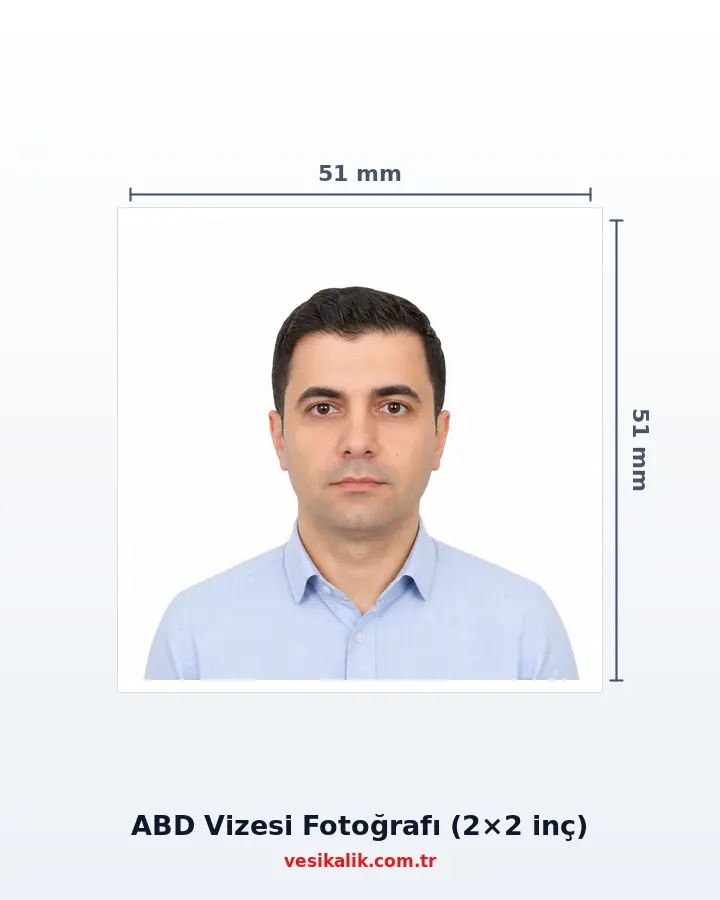
Generate a DS-160-ready 2×2 inch (51×51 mm) US visa photo with AI in 30 seconds — white background, JPEG under 240 KB, correct head ratio and automatic eyewear detection.
- Free analysis
- ICAO 9303
- AI-Powered
- GDPR compliant
Key takeaways
- 51×51 mm square — the only accepted DS-160 dimension
- JPEG file ≤ 240 KB, resolution 600×600 – 1200×1200 px
- Glasses NOT allowed (post-2016 rule); white background required
- Same spec for B1/B2, F1, J1 and H1B visa applications
Produce the US B1/B2, F1, J1 or H1B visa photo you upload to DS-160 (or take to the consulate) with the correct pixel/inch ratio.
How it works
DS-160 Ready 2×2 inch US Visa Photo — get it right in 4 steps.
-
Shoot without glasses in front of a white background
Glasses have been banned for US visas since 2016; hold the phone at eye level and take one daylight frame.
-
Upload the photo and start the DS-160 check
The AI measures the 50-69% head ratio, white background and square crop against State Department criteria.
-
Let the 51×51 mm square crop apply automatically
A JPEG between 600×600 and 1200×1200 pixels and under 240 KB is produced — ready for the DS-160 upload.
-
Upload the digital file to DS-160, ship the prints
The 2 51×51 mm prints you need for the interview ship to your address on a 10×15 sheet.
How much does an ID photo cost? (2026)
Photo analysis and the biometric compliance check are completely free. Digital file and print prices are below — identical to the live prices in the order wizard.
| Service | Price |
|---|---|
| Photo analysis & biometric check | Free |
| Digital File | 50.00 TRY |
| US Passport & Visa print package | 250.00 TRY |
| Cargo | 100.00 TRY |
Technical specifications
- Authority
- US Dept. of State / DS-160
- Size
- 2×2 inch (51×51 mm), square
- Pixels
- 600×600 – 1200×1200 px, square
- File
- JPEG, ≤ 240 KB
- Head height
- 1–1.375 inch (25–35 mm)
- Background
- White or off-white
- Freshness
- Taken within the last 6 months
Requirements checklist
- Photo must be square (equal width and height), minimum 600×600 pixels.
- JPEG file size cannot exceed 240 KB — DS-160 will reject larger files.
- Head vertically centered; from chin top to hair top must be 50-69% of frame.
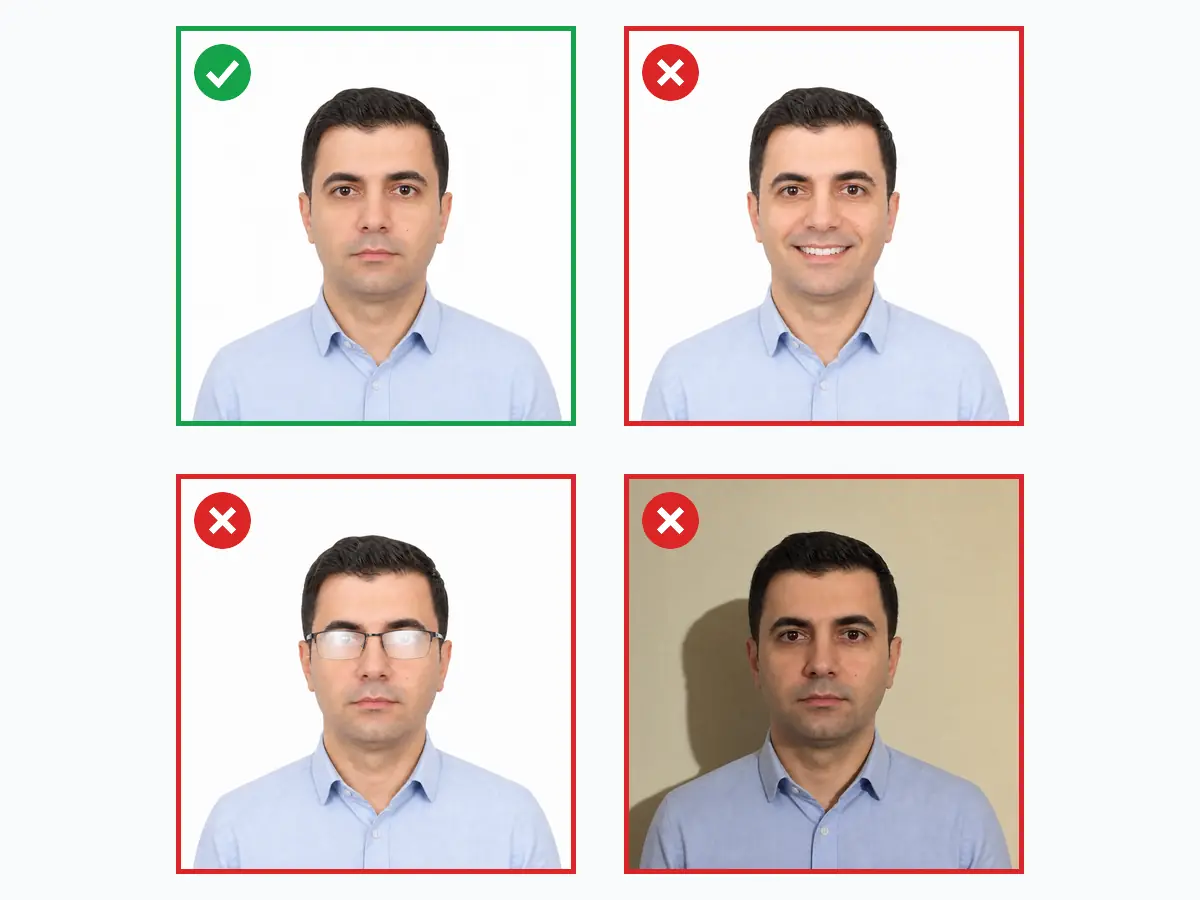
- Do NOT wear glasses — as of November 2016 US visa does not accept eyewear.
- Plain white or off-white background, zero shadows.
- Neutral expression, closed mouth, eyes fully open, look straight at camera.
Related document sizes
Official photo sizes for documents related to this page, with pixel equivalents.
| Document | Physical size | Pixels (300 DPI) | Background | Note |
|---|---|---|---|---|
| US Passport & Visa | 5.1 × 5.1 cm (2×2 in) | 600 × 600 px | White | Square format required |
| Canada Visa | 5 × 7 cm | 591 × 827 px | White | IRCC, back-of-print note |
| EU Passport & Schengen Visa | 3.5 × 4.5 cm | 413 × 531 px | White or light grey | ICAO compliant |
| United Kingdom Passport | 3.5 × 4.5 cm | 413 × 531 px | Cream / Light grey | ICAO compliant |
| Passport (TR) | 5 × 6 cm | 591 × 709 px | White | ICAO biometric |
| China Visa | 3.3 × 4.8 cm | 354 × 472 px | White | Compatible with most countries |
| Russia Visa | 3.5 × 4.5 cm | 413 × 531 px | White | Compatible with most countries |
US Visa Photo Requirements for DS-160 (2026)
The US visa photo is spelled out in the State Department's "Digital Image Requirements" and "Photo Requirements". For **DS-160** (nonimmigrant/tourist) or **DS-260** (immigrant) or **DS-1648** (refugee/A/G) online submissions the format must be a 2×2 inch (51×51 mm) **square**, between 600×600 and 1200×1200 pixels, in **sRGB colour space**, 24-bit colour, and saved as a **JPEG** smaller than 240 KB. The portal automatically rejects larger files, HEIC files, Display P3 files or wrong aspect ratios at the upload step.
The same photo standard applies to B1/B2 visitor, F1 student, J1 exchange, H1B work, K1 fiancé and IR/CR1 spouse-immigrant visas. The photo must have been taken within the last 6 months and must not have been used in a previous application — the 9 FAM 303.6 Facial Recognition software runs an automated match. Head height (chin to top of hair) must fill **50-69%** of the frame (25-35 mm), and the eyes must sit at **56-69%** of the frame height from the bottom. For other countries see the Canada visa photo and Schengen visa photo guides. **NOTE**: Turkish citizens require a visa and therefore apply via the standard DS-160 — **not ESTA (Visa Waiver Program)**.
Why Are Glasses Banned in US Visa Photos?
The single most important rule is eyewear: since November 2016 the US does not accept visa photos taken with glasses of any kind, medical exemptions aside. Even clear prescription glasses cause rejections; a medical exemption requires a signed doctor's statement. The rule exists to eliminate lens glare and frame shadows that break face-recognition matching.
vesikalik.com.tr's analysis report scores eyewear detection, lens glare, shadows and head angle separately on a red-yellow-green scale, so you can fix every flagged area before the DS-160 upload. That removes the risk of being asked for new documents — or having your application put on hold — because of the photo on interview day.
The iPhone User Trap: HEIC, Display P3 and Natural Smile
In 2024-2025 the most frequent technical rejections have been **for iPhone users**: (1) **HEIC format** — iPhone saves as HEIC/HEIF by default; DS-160 accepts only JPEG. If iOS "Settings → Camera → Formats → Most Compatible" is not chosen, conversion is required. (2) **Display P3 colour space** — iPhone shoots in P3 by default; the DS-160 system **requires sRGB** and rejects P3 files as "colour not correct". (3) **Compression ratio max 20:1** — JPEG quality below ~60% causes banding and gets "quality insufficient" rejections. vesikalik.com.tr converts outputs to sRGB and stays under the 20:1 ratio automatically.
**A natural smile IS accepted** — this differs from Schengen and UK! travel.state.gov and 9 FAM 303.6 state explicitly: *"A natural smile is considered a neutral facial expression"*. However a wide teeth-showing smile, raised brows or exaggerated expression is rejected — the system cannot always tell a natural smile from an exaggerated one, so a **slight neutral expression** is safest. Visible ears are not mandatory; the full face contour (jawline, forehead) must be unobstructed. Skin-smoothing filters, eye enlargement or face slimming break the biometric match and can lead to a full refusal.
How to Take a 2×2 inch Photo at Home
You can absolutely shoot a compliant photo without a studio: stand 30-50 cm in front of a plain, pattern-free (ideally white) wall so your shadow does not land on it, hold the phone vertically at exact eye level, and face a window so natural daylight falls evenly on your face. Keep a neutral expression, mouth closed, and look straight into the lens.
You do not need to fight with cropping, background or pixel ratios afterwards: vesikalik.com.tr analyses your upload with MediaPipe FaceLandmarker's 478-point face mesh, automatically re-frames the crop to the DS-160 head and eye ratios, swaps the background to white with the BiRefNet model, and optimises the JPEG below 240 KB.
Digital JPEG + 51×51 mm Print Together
Besides the DS-160-ready JPEG we also produce a 51×51 mm print version for the consulate interview, laid out four-up with cut marks on a 10×15 photo sheet that can be shipped to your address in Turkey. Your online upload and the physical copy you hand over at the interview match exactly the same specification.
It is recommended that the photo uploaded to the CEAC portal and the printed photo you bring to the interview are the very same frame; mismatched photos can trigger extra verification questions. Because vesikalik.com.tr generates both versions from the same processed source, that consistency is automatic.
Do's and Don'ts
Do
- Use a square 600×600 – 1200×1200 pixel resolution
- Choose a plain white or very light off-white background
- Keep the JPEG file size under 240 KB
- Head height must fall within 50-69% of the frame
- Use a photo taken within the last 6 months
Don't
- Wear any glasses (unless medically exempted with a doctor's note)
- Smile, show teeth or open your mouth
- Use a coloured, patterned or shadowed background
- Upload a file over 240 KB or below 600×600
- Apply filters, skin smoothing or face slimming
FAQ
Should I remove glasses for the photo?
What should I pay attention to when taking the photo?
What are the visa photo sizes and requirements?
Can I wear a headscarf in a visa photo?
Can I smile in a visa photo?
What are the US visa photo requirements?
Is your photo ready?
Upload your photo, run the compliance check and download your print-ready photo in seconds.
Analyze Your Photo Now