



Russia Visa Photo — 35×45 mm for E-Visa and VFS Consulate
For the Russia e-visa (evisa.kdmid.ru) or a VFS Global consulate application, prepare the 35×45 mm photo with AI in 30 seconds — a 450×600 pixel digital JPEG for the e-visa, 2 printed copies for the consulate; in both cases white/light grey background, neutral expression, no accessories.
- Free analysis
- ICAO 9303
- AI-Powered
- GDPR compliant
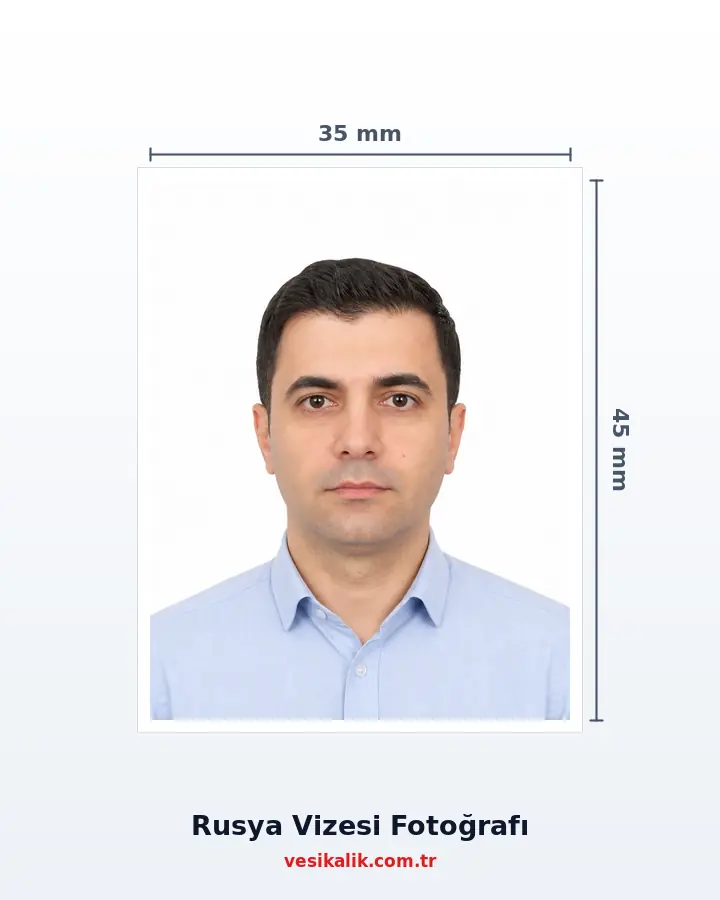
Key takeaways
- E-visa (evisa.kdmid.ru): 450×600 pixel digital JPEG, only 1 file
- Consulate / VFS Global: 2 printed copies of 35×45 mm, white background
- Green (hususi) and grey (service) Turkish passports: 30 days visa-free within 90 days
- Processing: e-visa 4-7 calendar days / consulate 7 working days (express 4)
Prepare the 35×45 mm photo you upload to the Russian e-visa (evisa.kdmid.ru, up to 16 days) or take to the Russian consulate via VFS Global (long-term, multi-entry) for tourist, business, private-invitation, work, student or cultural/sports event visa applications.
How it works
Russia Visa Photo — 35×45 mm for E-Visa and VFS Consulate — get it right in 4 steps.
-
Choose visa type: e-visa or VFS Global consulate
Tourist/business/private for stays under 16 days: e-visa (evisa.kdmid.ru); long-term, work, student: VFS Global consulate. Turkish green/grey passport: no visa (30 days visa-free).
-
Shoot in front of a white wall with a neutral expression
Phone at eye level; no hats, no sunglasses and no glasses (even thin clear no-glare glasses are technically allowed but carry a rejection risk in practice). Neutral expression, mouth closed, eyes open.
-
Upload to vesikalik.com.tr — get both outputs
The AI produces a 450×600 px JPEG for the e-visa AND a 35×45 mm print for the consulate; head is placed in the 32-36 mm band and the background moved to white/light grey.
-
E-visa: upload to the portal / Consulate: VFS appointment
E-visa: complete the application at evisa.kdmid.ru; approval in 4-7 days. Consulate: book at VFS Global (Istanbul/Ankara), hand over 2 printed photos with the paperwork. Payment in USD cash — credit cards not accepted.
How much does an ID photo cost? (2026)
Photo analysis and the biometric compliance check are completely free. Digital file and print prices are below — identical to the live prices in the order wizard.
| Service | Price |
|---|---|
| Photo analysis & biometric check | Free |
| Digital File | 50.00 TRY |
| Russia Visa print package | 250.00 TRY |
| Cargo | 100.00 TRY |
Technical specifications
- Authority
- MFA of Russia Consular Department (KDMID) — evisa.kdmid.ru / VFS Global
- Physical size
- 35×45 mm (portrait, consulate)
- Digital (e-visa)
- 450×600 px JPEG (evisa.kdmid.ru official size)
- Head height
- 32–36 mm (face 70-80% of the frame)
- Head-top margin
- 3-5 mm (top of head to top edge)
- Background
- White or very light grey, shadow-free
- Colour
- RGB colour, natural skin tone
- Resolution
- Minimum 600 DPI (print)
- Quantity
- E-visa: 1 digital / Consulate: 2 prints
- Accessories
- Hats/sunglasses BANNED; glasses discouraged; headscarf allowed
- Processing
- E-visa 4-7 calendar days / Consulate 7 working days (express 4)
- VFS Payment
- USD cash only — no credit cards
- Exemption
- Turkish green (hususi) + grey (service) passport: 30 days visa-free within 90 days
- Freshness
- Photo taken within the last 6 months
Requirements checklist
- Physical size 35×45 mm (portrait); e-visa digital 450×600 px JPEG.
- E-visa: 1 digital file; VFS/consulate: 2 printed copies.
- White or very light grey background, shadow-free.
- Head height 32-36 mm; 3-5 mm margin from head-top to top edge.
- Colour photo (RGB), natural skin tone.
- Neutral expression, mouth closed, eyes open, looking straight at the camera.
- No hats or sunglasses; glasses recommended to be removed.
- For headscarf photos, the face contour (forehead, temples, ears, chin) must be visible.
- Turkish bordo passport needs a visa; green/grey are visa-free 30 days.
- VFS payment in USD cash (credit cards not accepted).
Related document sizes
Official photo sizes for documents related to this page, with pixel equivalents.
| Document | Physical size | Pixels (300 DPI) | Background | Note |
|---|---|---|---|---|
| Russia Visa | 3.5 × 4.5 cm | 413 × 531 px | White | Compatible with most countries |
| China Visa | 3.3 × 4.8 cm | 354 × 472 px | White | Compatible with most countries |
| EU Passport & Schengen Visa | 3.5 × 4.5 cm | 413 × 531 px | White or light grey | ICAO compliant |
| Bar Association ID | 3.5 × 4.5 cm | 413 × 531 px | White | ICAO biometric |
| Passport (TR) | 5 × 6 cm | 591 × 709 px | White | ICAO biometric |
| US Passport & Visa | 5.1 × 5.1 cm (2×2 in) | 600 × 600 px | White | Square format required |
| United Kingdom Passport | 3.5 × 4.5 cm | 413 × 531 px | Cream / Light grey | ICAO compliant |
Russia Visa Photo: E-Visa or Consulate? (2026)
Since 1 August 2023, Turkish citizens can use the Russian unified e-visa system on the Ministry of Foreign Affairs Consular Department portal evisa.kdmid.ru; it grants single entry for **up to 16 days** for tourism, business, private invitation and sports/cultural events. All Russian regions — including Moscow, St. Petersburg, Sochi, Yekaterinburg and Kazan — are covered. For long stays, work, study or multiple entries, a classic application at the Russian Consulate via VFS Global Türkiye is required.
The photo standard starts with the same physical size (35×45 mm) on both channels, but **digital requirements differ**: for the e-visa a 450×600 pixel JPEG (official evisa.kdmid.ru size), for the consulate 2 printed 35×45 mm photos. Turkish **bordo** (general) passport holders need a visa; **green** (hususi) and **grey** (service) passport holders enjoy 30 days visa-free within 90 days under the Turkey-Russia agreement. For those needing a visa, vesikalik.com.tr produces both the e-visa digital version and the consulate print version from the same source shot.
E-Visa vs VFS Consulate Comparison
| Criterion | E-Visa (evisa.kdmid.ru) | VFS Global / Consulate |
|---|---|---|
| Photo size | 450×600 px JPEG (digital) | 35×45 mm (printed, 2 copies) |
| Stay | Max 16 days, single entry | 30-90 days, multiple entry possible |
| Processing | 4-7 calendar days | 7 working days (express 4) |
| For whom | Tourism, business, private, culture/sport | Long-term, work, student, family |
| Where to apply | Online (evisa.kdmid.ru) | VFS Global centre in Istanbul/Ankara |
| Coverage | All of Russia (2026 full coverage) | All of Russia |
| Accepted passport | Bordo (general) | Bordo (general) |
| Payment | Online card | USD cash (no credit cards) |
| Appointment | Not required | With or without appointment |
The e-visa is far more practical for short tourist trips: a minimal document list (passport scan + biometric photo), instant card payment, no appointment. The consulate route is mandatory for long-term residence, students, work permits or multiple-entry requests; the express option gets down to 4 working days, but the service fee + consular duty at VFS are payable **only in USD cash** — no credit cards.
vesikalik.com.tr produces both formats from the same burst: a 450×600 px JPEG for the e-visa and 2 printed 35×45 mm copies for the consulate. The size standard is shared with the Schengen visa, but Russia's digital pixel requirement (450×600) differs from the Schengen and China visa (354-420×472-560) portals — each country needs its own optimisation. For the general size background see the 35×45 mm photo guide.
Glasses and Accessory Rule for Russia Visas
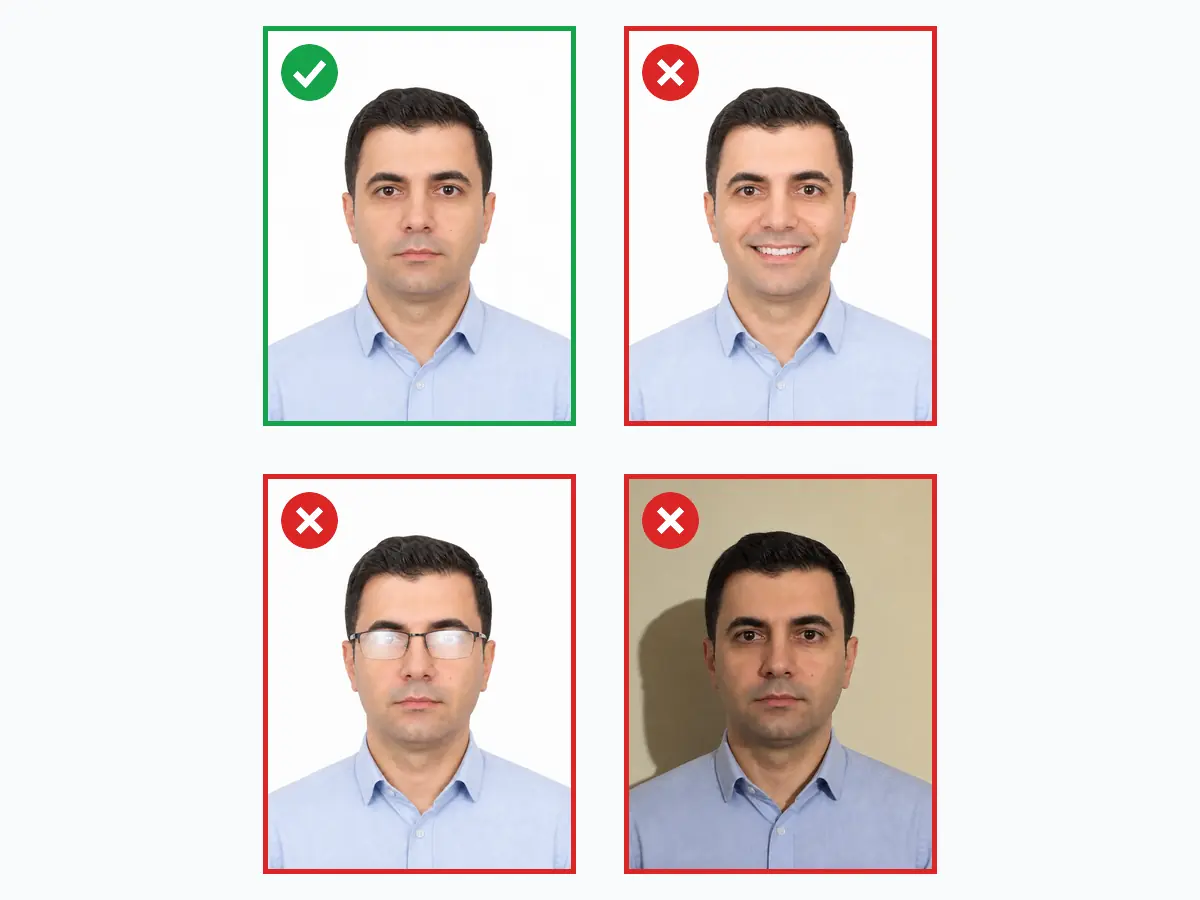
Russian consulate photo rules are stricter on accessories than most other countries. **Hats, sunglasses and coloured/tinted glasses are absolutely banned**; thin clear prescription glasses are technically allowed, but in practice most VFS applications get flagged when glasses are detected — removing glasses is the safe route. Headscarf is allowed for religious reasons, provided the face contour (forehead, temples, ears, chin) is fully visible.
Expression rules are also clear: neutral face, mouth closed, no teeth visible, no smile. Head upright, not tilted; direct look at the camera required. Some sources suggest a gender-specific face height (36 mm for men, 32 mm for women) but the official Russian standard accepts the **32-36 mm band for both**. Colour profile RGB with natural skin tone; black-and-white is not accepted. Photo minimum 600 DPI, sharp with balanced contrast.
VFS Global Process Details for Applicants in Turkey
For applications from Turkey the official intermediary is **VFS Global** — VHS from the earlier era is no longer authorised. VFS Global centres in Istanbul and Ankara accept both with and without appointment; booking a slot in busy periods shortens the wait. Documents: a passport valid for at least 6 months beyond the visa end date with 2 blank pages, the printout of the online form filled at visa.kdmid.ru, ID/residence permit copy, hotel reservation, return flight reservation and 2 biometric photos of 35×45 mm.
Two payment items: the VFS service fee (about $35) + the consular visa fee (varies by duration/type). Both are payable **only in USD cash** — credit cards are not accepted. This long-standing rule remains in force; VFS Turkey offices do not do currency exchange, so USD must be ready in advance. Standard processing 7 working days, express 4. Because Foreign Ministry or federal decisions can extend processing up to 30 days in some cases, travel should be planned at least 3 weeks in advance.
From At-Home Shoot to E-Visa Upload: Full Flow
A single selfie 30-50 cm in front of a plain white wall, phone held vertically at eye level, is enough — the wall colour does not matter because the BiRefNet segmentation model swaps the background to white. vesikalik.com.tr crops the head to the 32-36 mm band with MediaPipe FaceLandmarker's 478-point mesh, leaves a 3-5 mm margin from head-top to top edge, and fits the face to the 70-80% fill standard.
Two formats are produced: **(1) a 450×600 pixel JPEG for the e-visa** (ready to upload directly to evisa.kdmid.ru), and **(2) 2 printed 35×45 mm photos for the consulate** (laid out 8-up on a 10×15 sheet with cut marks, ready for the VFS Global appointment). From the same source photo, additional versions for Schengen visa (413×531 px), China visa (354-420×472-560 px, 40-120 KB) or UK visa can be produced — each country optimised to its own pixel and file limits. One shoot, several visa applications.
Do's and Don'ts
Do
- Prepare a 450×600 pixel JPEG for the e-visa (official evisa.kdmid.ru size)
- Prepare 2 printed 35×45 mm photos for the consulate
- White or very light grey plain background; no shadows
- Keep head height in the 32-36 mm band (face 70-80% of the frame)
- Neutral expression, mouth closed, eyes open, looking straight at the camera
Don't
- No hats, no sunglasses and no thick-frame glasses — BANNED
- Thin clear glasses are technically allowed but carry a rejection risk — remove them
- No smiling, no open mouth, no showing teeth, no tilted head
- No coloured, patterned, shadowed or gradient backgrounds
- Do not try paying at VFS by card — only USD cash is accepted
FAQ
Should I remove glasses for the photo?
What should I pay attention to when taking the photo?
What are the visa photo sizes and requirements?
Can I smile in a visa photo?
What are the Russia visa photo requirements?
Do I need a paper photo or a digital file for visa applications?
Is your photo ready?
Upload your photo, run the compliance check and download your print-ready photo in seconds.
Analyze Your Photo Now