



Green Card / DV Lottery Photo — 600×600 px Digital Standard
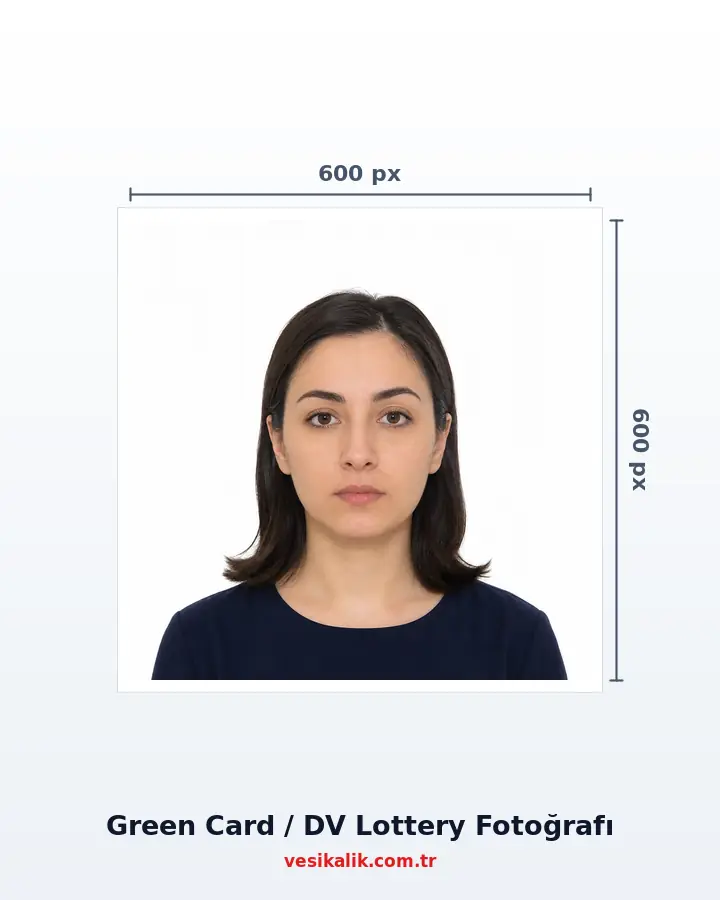
The US Diversity Visa (DV Lottery / Green Card draw) entry is fully digital: the photo must be a 600×600 pixel square JPEG of at most 240 KB, head height 50–69% of the frame, white/off-white background. The most critical rule: re-uploading a photo used in previous years is grounds for disqualification.
- At home, no studio
- Free analysis
- ICAO 9303
- AI-Powered
Key takeaways
- 600×600 px square JPEG, max 240 KB — the E-DV portal accepts no other format
- Head height 50–69% of the frame; eyes within the 56–69% band from the bottom
- REUSING a photo from a previous DV entry = disqualification
- A separate photo for the spouse and every child under 21; entry is FREE (dvprogram.state.gov)
Prepare the 600×600 pixel, ≤240 KB JPEG photos uploaded to the E-DV portal for the main applicant, spouse and children under 21 during the annual October–November US Diversity Visa (DV Lottery) window; the 51×51 mm print for the winners' consular interview is produced from the same shot.
Technical specifications
- Standard
- travel.state.gov DV Photo Requirements
- Authority
- US Department of State (KCC / E-DV)
- Digital format
- 600×600 px SQUARE, JPEG (JFIF), 24-bit sRGB
- File size
- Max 240 KB
- Head height
- 50–69% of the frame
- Eye band
- 56–69% from the bottom edge
- Background
- White / off-white, shadow-free
- Photo age
- Last 6 months; NOT used in a previous entry
- Glasses
- BANNED (since November 2016)
- Family
- Separate photo for spouse + every child under 21
- Entry window
- Usually early October – early November (~1 month)
- Fee
- Entry is FREE (dvprogram.state.gov)
- Print option
- 51×51 mm (2×2 in) @300 DPI — interview stage
Requirements checklist
- 600×600 pixel square JPEG, under 240 KB.
- Head height 50-69%; eyes within the 56-69% band.
- White/off-white shadow-free background.
- Photo taken within the last 6 months and never used in any previous DV entry.
- No glasses; neutral expression, direct look.
- Separate photos ready for the spouse + every child under 21.
- Entry will be made only at dvprogram.state.gov (free).
- Confirmation number saved (the only key for status check).
Related document sizes
Official photo sizes for documents related to this page, with pixel equivalents.
| Document | Physical size | Pixels (300 DPI) | Background | Note |
|---|---|---|---|---|
| US Passport & Visa | 5.1 × 5.1 cm (2×2 in) | 600 × 600 px | White | Square format required |
| US Green Card / DV Lottery | 5.1 × 5.1 cm (2×2 in) | 600 × 600 px | White | Square format required |
| EU Passport & Schengen Visa | 3.5 × 4.5 cm | 413 × 531 px | White or light grey | ICAO compliant |
| United Kingdom Passport | 3.5 × 4.5 cm | 413 × 531 px | Cream / Light grey | ICAO compliant |
| Canada Visa | 3.5 × 4.5 cm | 413 × 531 px | White | IRCC, back-of-print note |
| India e-Visa | 5.1 × 5.1 cm (2×2 in) | 350–1000 px | White | Square format required |
| South Korea K-ETA | 5 × 5 cm | 700 × 700 px | White | Digital upload |
How it works
Green Card / DV Lottery Photo — 600×600 px Digital Standard — get it right in 4 steps.
-
Track the entry window: usually early October – early November
The DV entry is made only at [[ext:https://dvprogram.state.gov|dvprogram.state.gov]] and is entirely free. Sites asking for money are not official. Preparing photos before the window opens avoids the last-day rush disqualification risk.
-
Shoot every family member separately on a white background
A separate photo is required for the main applicant + spouse + every child under 21. No glasses, neutral expression, direct look. For babies: eyes open, no hands/supports visible in the background.
-
Upload the photo and get the DV check
The AI scores the head ratio (50-69%), eye band (56-69%), background whiteness and shadows against the travel.state.gov criteria, and auto-aligns the crop to the 600×600 square.
-
Download the 600×600 JPEG ≤240 KB and submit it to E-DV
The output is generated at exactly 600×600 pixels, JPEG and under 240 KB — leaving the E-DV portal no reason to reject. A 51×51 mm (2×2 in) print for the interview stage can be ordered from the same shot.
From your photo to delivery: how it works
-
Take Your Photo ~30 sec
Upload a shot taken at home with your phone; no studio visit needed.
-
AI Analysis ~1-2 sec
A 478-point face mesh checks head ratio, background, glasses and expression.
-
Auto Fix instant
Background turns white and the crop is applied to the official size automatically.
-
Digital Delivery instant
Download an application-ready JPEG matching the required size and file limit.
-
Print & Shipping 1-3 business days
Printed ID photos are shipped to your address (optional).
What Rules Must the Green Card (DV Lottery) Photo Meet? (2026)
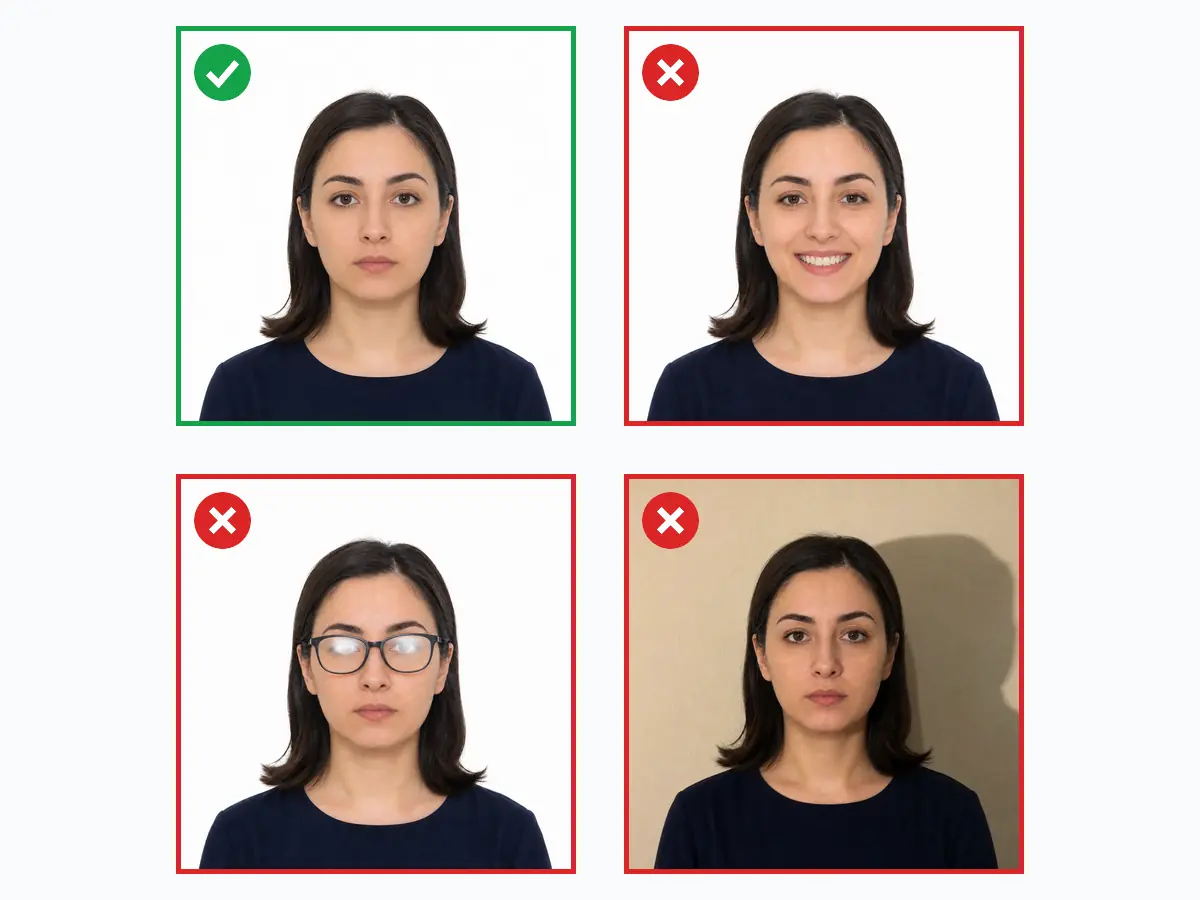
The US Diversity Visa program (popularly the **Green Card lottery**) is a fully digital entry with millions of registrations worldwide each year and consistently strong participation from Türkiye. The photo standard is defined in the travel.state.gov DV instructions: **600×600 pixel square**, **JPEG** format, **at most 240 KB**, 24-bit colour; head height **50–69%** of the frame, eyes within the 56–69% band from the bottom; white or off-white, completely shadow-free background.
The DV photo belongs to the same family as the US visa photo (2×2 inch square, same composition rules) but its digital limits are harder: the E-DV portal **rejects at upload time** any size other than 600×600 and any file above 240 KB. The Green Card mode of vesikalik.com.tr produces the output at exactly this specification — a portal-ready file downloads with no fiddling with pixels, format or file size.
Why Does Photo Reuse Get You Disqualified?
The Kentucky Consular Center (KCC) runs **face-matching and duplicate-detection algorithms** across millions of entries every DV cycle. One of the most common disqualification causes is a photo violation: **re-uploading the exact photo used in a previous year's entry** automatically breaks the "last 6 months" rule and eliminates the entry. Likewise, duplicate entries (one person filing twice in the same cycle) are caught by face matching.
The practical takeaway: **a fresh shot is mandatory for every DV cycle.** If the window opens in October, a frame taken in September–October is the safest choice. vesikalik.com.tr keeps the shooting date in the processing record; the risk of accidentally reusing last year's file disappears with a fresh analysis each year.
The E-DV Portal's Technical Limits: 600×600, JPEG, 240 KB
| Property | Requirement | Portal behaviour |
|---|---|---|
| Dimensions | Exactly 600×600 pixels (square) | Other sizes → upload rejected |
| Format | JPEG (JFIF), 24-bit sRGB | PNG/HEIC → not accepted |
| File size | ≤240 KB | Above → upload rejected |
| Head height | 50–69% of the frame | Automated + human review; violation → disqualification |
| Eye position | 56–69% from the bottom edge | Automated + human review |
| Background | White / off-white, shadow-free | Eliminated at review stage |
| Freshness | Last 6 months + not used in a previous entry | Detected by face matching → disqualification |
To sum the table up in one sentence: technical limits (dimensions, format, KB) are enforced **at upload time**, while composition rules (head ratio, eye band, background, freshness) are checked **at selection and interview stages**. The portal accepting your file does not mean the photo is compliant — a technically passing photo with a 45% head can burn a winning entry at the interview stage.
vesikalik.com.tr checks both layers: the 478-point face mesh aligns the head ratio into the 50-69% band, background whiteness and shadows are verified, and the output is **auto-compressed** under 240 KB as a 600×600 JPEG (with a binary search that minimises quality loss). For infant and child photos see the baby photo guide — in DV, a photo of every child under 21 is mandatory.
Family Entries: How to Prepare Spouse and Child Photos?
Besides the main applicant, a separate photo is uploaded for the **spouse and all unmarried children under 21** — even if a child lives in the US or will not travel. A missing family-member photo is among the most common mistakes that lead to a **visa refusal** upon winning. Both spouses may file their own entries; this doubles the family's chances (each entry lists the other spouse as a derivative).
Baby photo rules flex but do not vanish: eyes must be open; the baby can lie on a plain white surface or be supported in a white-covered seat — **the supporting hand must not be visible**. Pacifiers, toys and hats are banned. The baby mode of vesikalik.com.tr adjusts the head-ratio tolerance to the DV criteria and auto-fixes the crop.
What Happens After Entry? Results, DS-260 and the Interview Photo
After the window closes, results are typically announced in **May** on the dvprogram.state.gov Entrant Status Check screen — no e-mails or letters are sent; the only key is the **confirmation number** issued at the end of registration. Winners complete the DS-260 immigrant visa form and are called to a consular interview, where **two 51×51 mm (2×2 in) prints** and a new digital photo are required.
The interview photo should also differ from the entry photo (the 6-month rule applies here too). vesikalik.com.tr produces both the entry-season 600×600 digital file and the interview-season US-standard 51×51 print from the same account. For other digital-portal applications see the India e-visa and K-ETA guides; for classic consular visas the starting point is the Schengen photo page.
Do's and Don'ts
Do
5- Take a NEW photo for every entry year (within the last 6 months)
- Use a white or off-white, shadow-free background
- Keep head height within the 50-69% band of the frame
- Prepare a separate photo for the spouse and every child under 21
- Enter only at dvprogram.state.gov, free of charge
Don't
5- Do NOT re-upload a photo used in a previous DV entry or visa application
- No photos with glasses (strictly banned since 2016)
- No filters, retouching or AI beautification
- Do not register through sites charging money as "Green Card consultancy"
- No selfies or very close wide-angle shots
FAQ
Should I remove glasses for the photo?
For which countries can I generate valid photos?
What should I pay attention to when taking the photo?
What are the visa photo sizes and requirements?
Can I smile in a visa photo?
Do I need a paper photo or a digital file for visa applications?
How much does an ID photo cost? (2026)
Photo analysis and the biometric compliance check are completely free. Digital file and print prices are below — identical to the live prices in the order wizard.
Why vesikalik.com.tr?
- 10+ years of studio experience
- 5,000+ ID photos printed
- 35,000+ AI analyses run
- ~1.6 sn average analysis time
- 478 point face analysis
- 27+ document & visa standards
Green Card / DV Lottery Photo — 600×600 px Digital Standard — customer reviews
-
★★★★★
DV-2027 entry for a family of four — all photos prepared in one evening, 600×600 and under 240 KB automatically.
-
★★★★★
JPEG came out around 180 KB, well within the limit. Zero photo issues at entry.
-
★★★★★
Disqualified last year for reusing an old photo. Fresh shot this year, upload went through clean.
-
★★★★★
The E-DV portal accepted the file on the first try. Head-ratio auto-crop saved manual fiddling.
-
★★★★★
Baby photo tips actually worked — the entry with our newborn was accepted.
Is your photo ready?
Skip the photographer; take your photo at home, run the compliance check and download your print-ready photo in seconds.
- No photographer needed
- Free
- No sign-up
- Results in seconds