



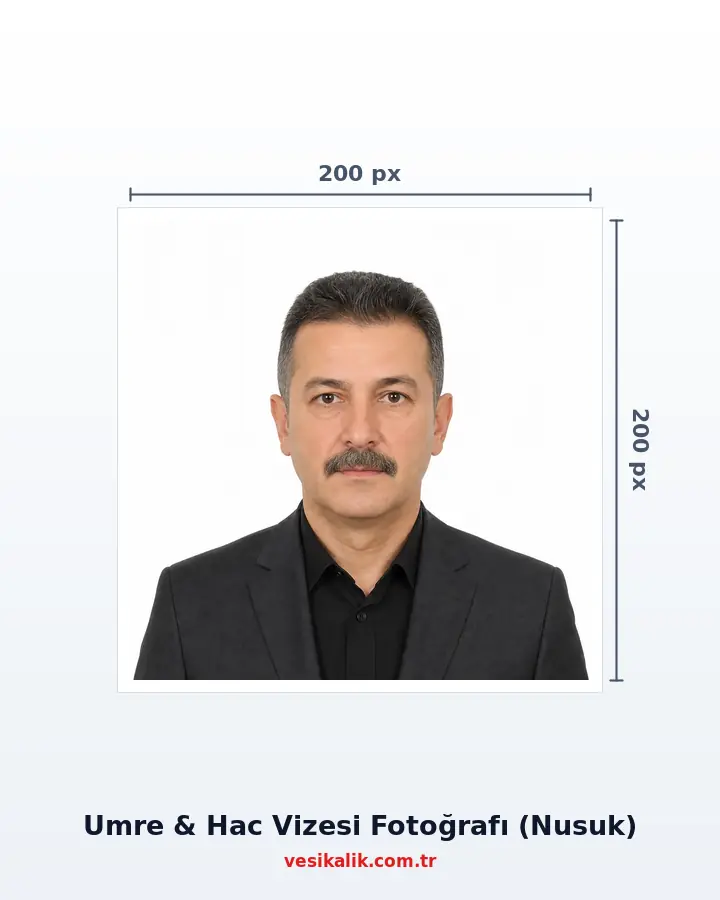
Umrah & Hajj Visa Photo — Nusuk 200×200 px, ≤18 KB
Umrah and Hajj visas are now issued through digital applications on the Nusuk platform, and the photo rule is unusual: a 200×200 pixel square JPEG, max 18 KB, pure white background. Phone photos default to 2-8 MB, so file size is the top rejection cause. vesikalik.com.tr runs the biometric checks and downloads your photo as an exact 200×200 px JPEG under 18 KB.
- At home, no studio
- Free analysis
- ICAO 9303
- AI-Powered
Key takeaways
- Nusuk digital application: 200×200 px square JPEG, max 18 KB
- Pure white background; face fills 70-80% of the square
- Modest dress is a system rule — covered shoulders, low necklines rejected
- Headscarf allowed for women (face outline visible); caps forbidden for men
- Exceeding the file size is the top rejection cause — guaranteed by auto compression
Prepare the 200×200 pixel JPEG under 18 KB for the photo step when applying for an Umrah or Hajj visa on the Nusuk platform (individual, family or group); the tourist eVisa upload on visitsaudi uses the same file.
Technical specifications
- Platform
- Nusuk (hajj.nusuk.sa) — digital application
- Pixel size
- 200 × 200 px (square)
- File
- JPEG, max 18 KB
- Tourist eVisa
- visitsaudi: 200×200 px, 5-100 KB
- Background
- Pure white
- Face ratio
- 70-80% of the square
- Dress
- Modest; covered shoulders, low necklines rejected
- Headscarf
- Allowed for women; face outline fully visible
- Male headwear
- Caps/hats forbidden
- Expression
- Neutral; mouth closed, eyes open
- Photo age
- Last 6 months
Requirements checklist
- File is an exact 200×200 px square JPEG.
- File size under 18 KB.
- Background pure white, shadow-free.
- Face fills 70-80% of the square.
- Shoulders covered, clothing modest.
- No headwear for men; face outline visible for women.
- Neutral expression, eyes open, mouth closed.
- Photo taken within the last 6 months.
Related document sizes
Official photo sizes for documents related to this page, with pixel equivalents.
| Document | Physical size | Pixels (300 DPI) | Background | Note |
|---|---|---|---|---|
| Umrah / Hajj Visa (Nusuk) | 5 × 5 cm | 200 × 200 px | White | Digital upload |
| UAE / Dubai Visa | 4.3 × 5.5 cm | 508 × 650 px | White | ICAO compliant |
| Passport (TR) | 5 × 6 cm | 591 × 709 px | White | ICAO biometric |
| EU Passport & Schengen Visa | 3.5 × 4.5 cm | 413 × 531 px | White or light grey | ICAO compliant |
| India e-Visa | 5.1 × 5.1 cm (2×2 in) | 350–1000 px | White | Square format required |
| Bar Association ID | 3.5 × 4.5 cm | 413 × 531 px | White | ICAO biometric |
| National ID Card (TR) | 5 × 6 cm | 591 × 709 px | White | ICAO biometric |
| South Korea K-ETA | 5 × 5 cm | 700 × 700 px | White | Digital upload |
How it works
Umrah & Hajj Visa Photo — Nusuk 200×200 px, ≤18 KB — get it right in 4 steps.
-
Shoot in modest dress in front of a white background
Wear clothing that covers the shoulders with no low neckline; a plain headscarf is fine for women, caps come off for men. Phone at eye level, neutral expression.
-
Upload the photo and get the biometric check
The AI checks the face ratio (70-80% square fill), pure white background, expression and face-outline visibility against the Nusuk criteria, auto-aligning the square crop.
-
Download the 200×200 px JPEG under 18 KB
The processed photo downloads as an exact 200×200 pixel square JPEG, with quality auto-tuned to compress it below 18 KB — ready for the Nusuk upload.
-
Upload to the Nusuk (or visitsaudi) application
Upload the file at the photo step of the [[ext:https://hajj.nusuk.sa|Nusuk]] Umrah/Hajj application. If travelling on a tourist eVisa, the same file also works on the visitsaudi portal (5-100 KB range).
From your photo to delivery: how it works
-
Take Your Photo ~30 sec
Upload a shot taken at home with your phone; no studio visit needed.
-
AI Analysis ~1-2 sec
A 478-point face mesh checks head ratio, background, glasses and expression.
-
Auto Fix instant
Background turns white and the crop is applied to the official size automatically.
-
Digital Delivery instant
Download an application-ready JPEG matching the required size and file limit.
-
Print & Shipping 1-3 business days
Printed ID photos are shipped to your address (optional).
Why Are the Nusuk Photo Rules So Different? (2026)
Saudi Arabia has fully digitalised Umrah and Hajj visas through the Nusuk platform; instead of a paper photo, you upload a file. The rule is unusual: a **200×200 pixel square JPEG, max 18 KB**, pure white background, with the face filling 70-80% of the square. Hundreds of thousands of pilgrims pass through this step every year.
Even when applications run through an agency, the photo is usually uploaded by the applicant or handed to the agency as a ready file. Scanning a printed passport photo rarely fits either the ratio or the file size; the cleanest path is a digital file produced natively for the 200×200/18 KB target. For the exceptional paper consulate route, a 4×6 cm white-background print may be requested — a print option is also available at checkout.
The 18 KB Trap: File Size Is the Top Rejection Cause
Modern phones save photos at 2-8 MB; Nusuk's 18 KB limit is less than one percent of that. Hence the most common error message is a file size overflow. Using a random "compressor site" creates two new problems: the ratio breaks (the 200×200 square rule) or the quality drops so far that face detection fails.
vesikalik.com.tr balances this automatically: the processed photo is first scaled to exactly 200×200 pixels, then the JPEG quality is tuned step by step until the file is **under 18 KB** — with the least possible loss of image quality. The result is a file that passes both the pixel and the size check of Nusuk in one go. The same engine also serves the Green Card 240 KB and K-ETA 100 KB limits.
How Are the Modest Dress and Headscarf Rules Applied?
Nusuk is one of the world's rare visa systems with a dress code: **shoulders must be covered; low necklines and sleeveless tops are rejected**. A headscarf is allowed for women and is effectively the norm; the condition is that the face outline (forehead, brows, cheeks, chin) remains fully visible. Since a white scarf can create contour problems against the white background, a plain darker scarf is safer. For men, caps, hats and any head covering are forbidden.
A frequent question concerns ihram: **ihram clothing is not wanted** in the application photo; normal modest daily clothing is the right choice. Expression rules match ICAO — neutral face, closed mouth, direct gaze at the camera. vesikalik.com.tr checks shoulder coverage, face-outline visibility and scarf-background contrast as separate lines and flags a failing frame before you upload.
Umrah Visa, Hajj Registration and Tourist eVisa: Which Photo Goes Where?
| Document | Platform | Photo requirement |
|---|---|---|
| Umrah visa | Nusuk (hajj.nusuk.sa) | 200×200 px JPEG, ≤18 KB, white background |
| Hajj visa (group) | Nusuk + national organisation | 200×200 px digital + biometric prints (for the agency) |
| Tourist eVisa | visitsaudi.com | 200×200 px JPEG, 5-100 KB |
| Consulate visa (exception) | visa.mofa.gov.sa | 4×6 cm print, white background |
The photo logic of the three digital routes is identical (square, white background, modest dress); only the KB ranges differ. Since the Nusuk output of vesikalik.com.tr is produced for the tightest limit (18 KB), it is valid on all three portals. Pilgrims travelling with organised groups are often asked for additional biometric prints by the agency — a 35×45 or 50×60 print sheet can be ordered from the same shot.
In family or group applications, each traveller's photo is uploaded separately, babies and children included. Group leaders can collect the whole group's photos from a single account with unlimited analyses — each analysis is reported independently, and failing frames come back with a retake recommendation.
Practical Tips for Shooting at Home
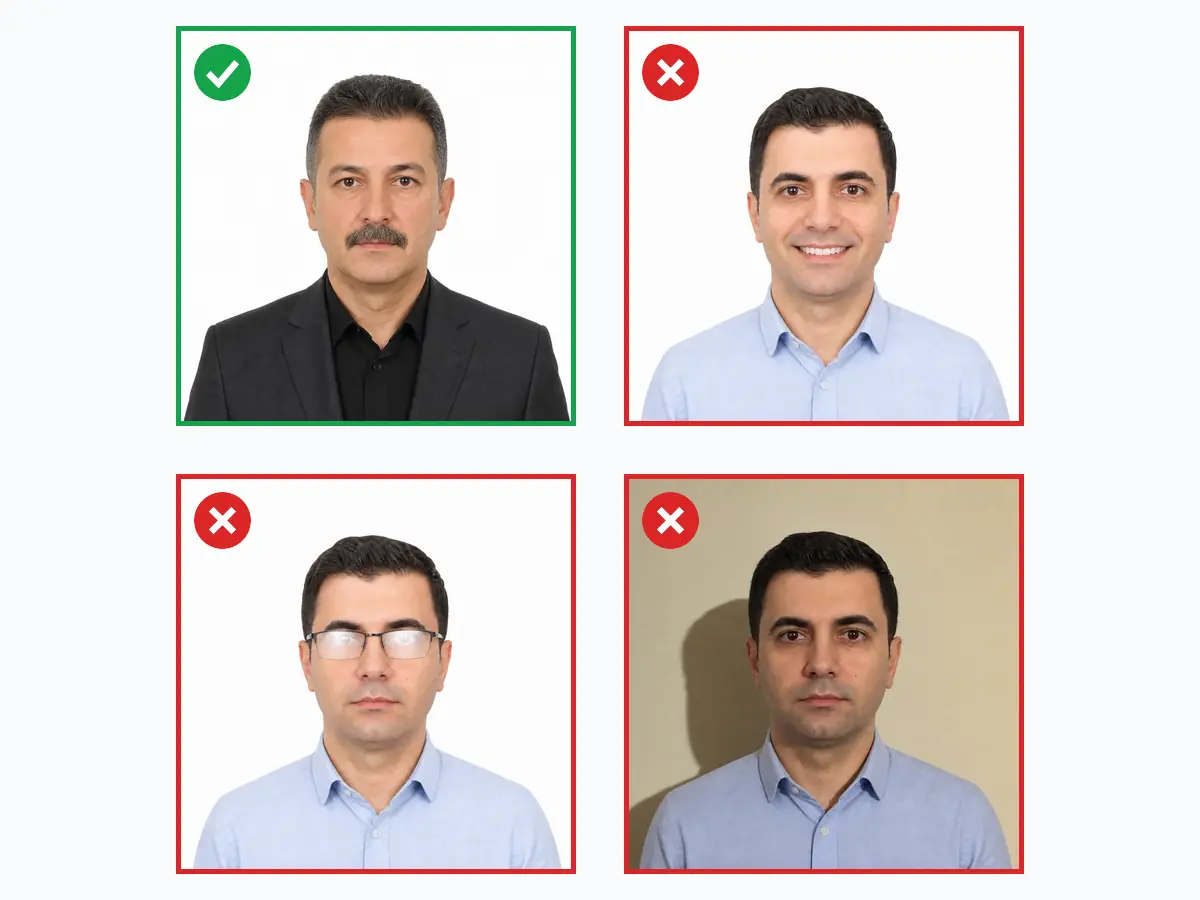
Stand facing a daylight window in front of a plain white wall; ask someone to hold the phone at your eye level. Soft morning or late-afternoon light reduces shadows better than harsh midday light. Wet or gelled hair, a shiny forehead and glasses glare cause more visible problems in a small 200×200 frame — the face should be matte and plain.
A final check before uploading: keep the file name in Latin characters without spaces, use a current Chrome/Safari version, and make sure the person in the photo matches the passport details in the form. For connected Gulf trips, the UAE/Dubai visa photo can be produced from the same account.
Do's and Don'ts
Do
5- Use a pure white, shadow-free background
- Wear modest clothing that covers the shoulders
- Make the face fill 70-80% of the square
- Verify the JPEG file is under 18 KB
- With a headscarf, keep the forehead-brow-chin outline visible
Don't
5- Do not upload the raw phone photo (2-8 MB) directly — it is rejected
- No low necklines, sleeveless tops or patterned clothing
- No caps, hats or head coverings for men
- Do not shoot in ihram clothing (not wanted in the application photo)
- No smiling, filters or retouching
FAQ
How does vesikalik.com.tr work?
What should I pay attention to when taking the photo?
What are the visa photo sizes and requirements?
Can I wear a headscarf in a visa photo?
Can I smile in a visa photo?
Do I need a paper photo or a digital file for visa applications?
How much does an ID photo cost? (2026)
Photo analysis and the biometric compliance check are completely free. Digital file and print prices are below — identical to the live prices in the order wizard.
Why vesikalik.com.tr?
- 10+ years of studio experience
- 5,000+ ID photos printed
- 35,000+ AI analyses run
- ~1.6 sn average analysis time
- 478 point face analysis
- 27+ document & visa standards
Umrah & Hajj Visa Photo — Nusuk 200×200 px, ≤18 KB — customer reviews
-
★★★★★
Nusuk kept rejecting my phone photo for file size. The 200×200 export here was 14 KB and uploaded first try.
-
★★★★★
Prepared photos for my parents and myself in one evening. All three Umrah visas approved.
-
★★★★★
Group leader for 25 pilgrims — collected everyone's photo via this tool, no rejections.
-
★★★★★
The modest-dress and face-coverage checks matched exactly what Nusuk asks. Zero back-and-forth.
-
★★★★★
First frame flagged for background shadow; retook near a window and it passed.
Is your photo ready?
Skip the photographer; take your photo at home, run the compliance check and download your print-ready photo in seconds.
- No photographer needed
- Free
- No sign-up
- Results in seconds