



Japan Visa Photo — 45×45 mm Square, White Background, 27 mm Head
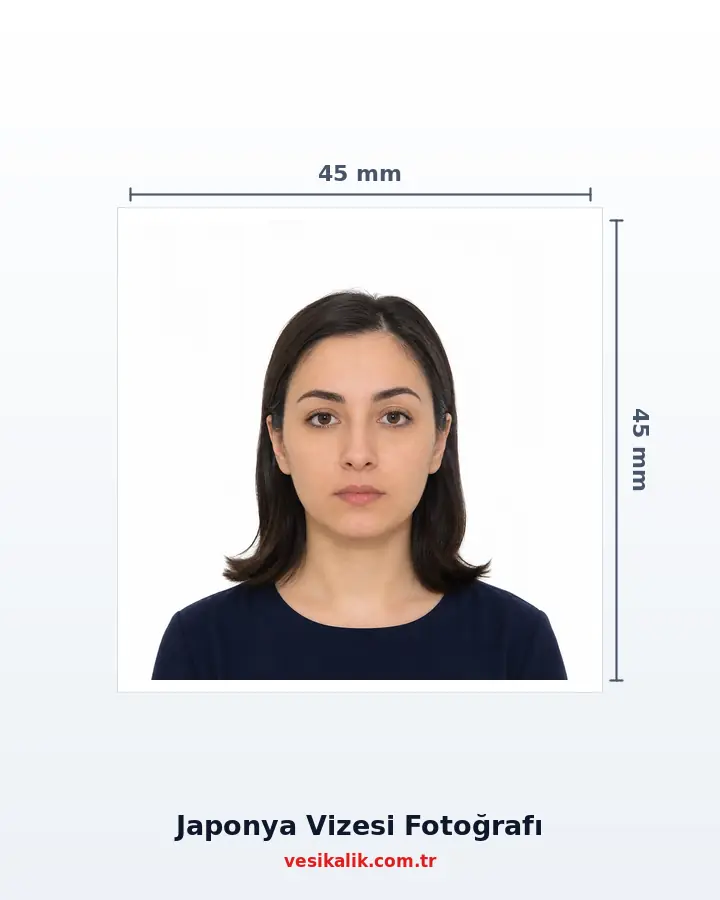
The official standard for the Japan visa photo (MOFA) is unusual: a 45×45 mm square, white background, head height about 27 mm, taken within the last 6 months. The 35×45 vertical photo handed out by studios is the top rejection cause at consulates requiring the square. eVisa uploads need a 600×600 pixel JPEG under 240 KB — both are produced from a single shot.
- At home, no studio
- Free analysis
- ICAO 9303
- AI-Powered
Key takeaways
- MOFA standard: a 45×45 mm SQUARE — a 35×45 vertical photo risks rejection
- White background; head height about 27 mm
- Taken within the last 6 months; name written on the back
- eVisa upload: 600×600 px JPEG under 240 KB
- Some consulates accept 35×45 — verify your application point in advance
Prepare the 45×45 mm square prints for the consulate/agency and, if eVisa applies, the 600×600 px JPEG under 240 KB — from a single shot — for Japan tourist, student or business visa applications.
Technical specifications
- Standard
- Japan MOFA visa photo standard
- Print size
- 45 × 45 mm (square)
- Head height
- About 27 mm (chin to crown)
- Background
- White, plain, shadow-free
- eVisa digital
- JPEG, min 600×600 px, ≤240 KB
- Photo age
- Last 6 months
- Expression
- Neutral; mouth closed, eyes open
- Glasses
- Removal recommended
- Back side
- Name written on the back of the print
- Alternative
- Some consulates accept 35×45 — verify in advance
Requirements checklist
- Size 45×45 mm square (not 35×45).
- Head height at the ~27 mm ratio.
- Background white, shadow-free.
- Neutral expression; no glasses.
- Photo taken within the last 6 months.
- Name written on the back of the print.
- If eVisa applies, the 600×600 px JPEG under 240 KB is ready.
- Consulate/agency document list checked.
Related document sizes
Official photo sizes for documents related to this page, with pixel equivalents.
| Document | Physical size | Pixels (300 DPI) | Background | Note |
|---|---|---|---|---|
| Japan Visa | 4.5 × 4.5 cm | 531 × 531 px | White | Square format required |
| South Korea K-ETA | 5 × 5 cm | 700 × 700 px | White | Digital upload |
| India e-Visa | 5.1 × 5.1 cm (2×2 in) | 350–1000 px | White | Square format required |
| US Green Card / DV Lottery | 5.1 × 5.1 cm (2×2 in) | 600 × 600 px | White | Square format required |
| EU Passport & Schengen Visa | 3.5 × 4.5 cm | 413 × 531 px | White or light grey | ICAO compliant |
| US Passport & Visa | 5.1 × 5.1 cm (2×2 in) | 600 × 600 px | White | Square format required |
| Passport (TR) | 5 × 6 cm | 591 × 709 px | White | ICAO biometric |
| Bar Association ID | 3.5 × 4.5 cm | 413 × 531 px | White | ICAO biometric |
How it works
Japan Visa Photo — 45×45 mm Square, White Background, 27 mm Head — get it right in 4 steps.
-
Shoot in front of a white background with a neutral expression
Phone at eye level; face towards the camera, hair off the face. The Japanese standard is strict on expression: mouth closed, no smiling, eyes fully open.
-
Upload the photo and get the biometric check
The AI checks the 45×45 square composition, the ~27 mm head height ratio, the white background and the expression against the MOFA criteria, auto-aligning the crop.
-
Download the prints and/or the eVisa JPEG
For the consulate application, the cut-marked 10×15 print sheet arrives by post; for the eVisa, the 600×600 px JPEG under 240 KB downloads instantly.
-
Complete the application documents
Apply with the form, passport and photo per the consulate/agency document list. Remember to write your name on the back of the printed photo — a formal request specific to Japan.
From your photo to delivery: how it works
-
Take Your Photo ~30 sec
Upload a shot taken at home with your phone; no studio visit needed.
-
AI Analysis ~1-2 sec
A 478-point face mesh checks head ratio, background, glasses and expression.
-
Auto Fix instant
Background turns white and the crop is applied to the official size automatically.
-
Digital Delivery instant
Download an application-ready JPEG matching the required size and file limit.
-
Print & Shipping 1-3 business days
Printed ID photos are shipped to your address (optional).
Why Is the Japan Visa Photo a 45×45 mm Square? (2026)
The visa photo standard of Japan's Ministry of Foreign Affairs (MOFA) is the square format that remains a minority worldwide: **45×45 mm, white background, head height about 27 mm** (chin to crown). The photo must be taken within the last 6 months, and the applicant's name must be written on the back of the print — a detail specific to Japanese bureaucracy that counts as a missing document when forgotten.
Since the default output of photo studios is 35×45 mm vertical, the wrong size is the top rejection cause at application points requiring the square. Some Japanese consulates do accept 35×45 in practice; but because which point wants which size can vary, **the square size is the safe choice in every case** — a 45×45 can be cropped to 35×45 if needed, but not the other way round.
Head Height 27 mm: the Finest Rule of the Japanese Standard
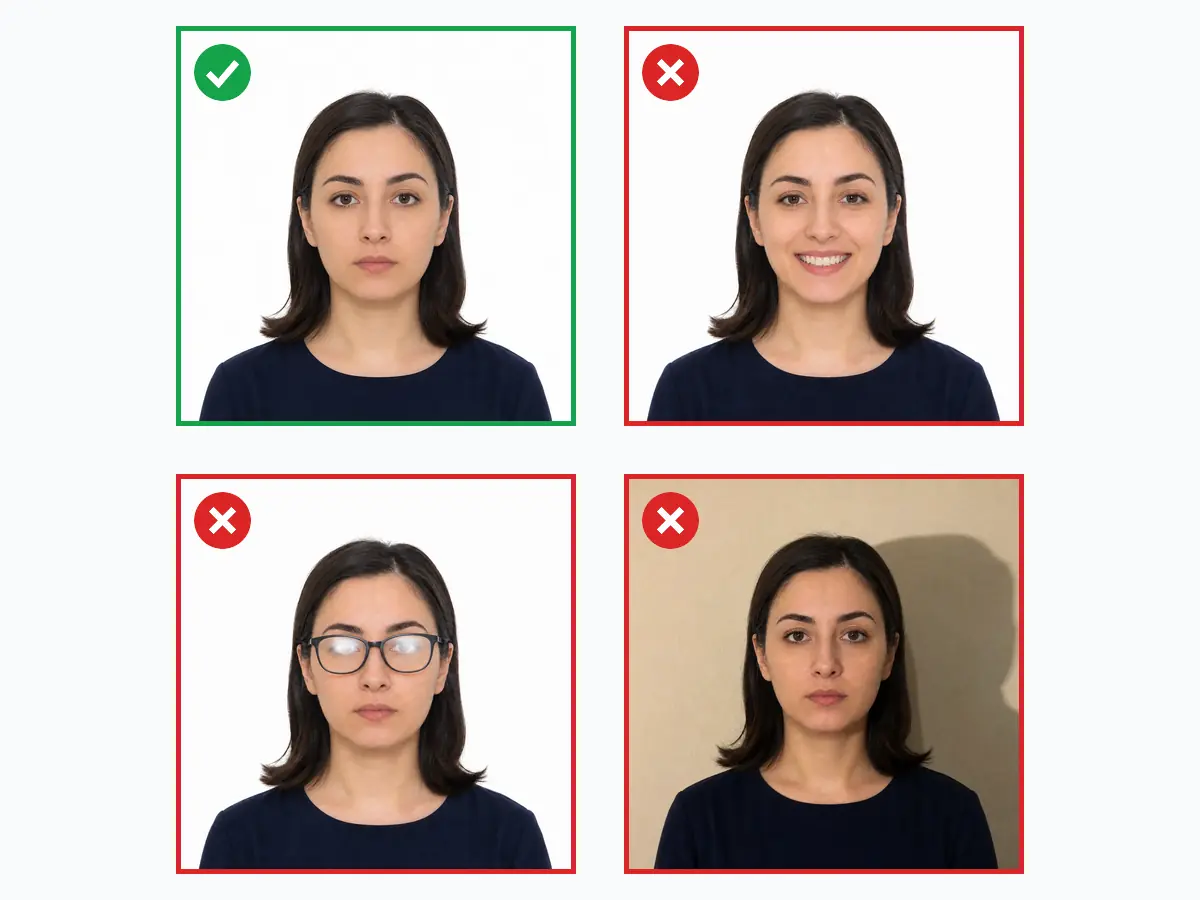
In the MOFA template the head must sit within a specific band of the square: **~27 mm from chin to crown** (60% of the photo height), with a few millimetres of space above the head. This ratio is the detail most often missed in manual framing — too large and the head gets cropped, too small and the photo is rejected as "shot from afar".
vesikalik.com.tr sets this ratio automatically: face detection measures the chin-crown points, the crop is aligned to the 27 mm band, and the head ratio appears as its own check line in the analysis report. Expression rules are also strictly interpreted in Japan: mouth fully closed, no smiling, eyes fully open, hair off the brows. The same strictness exists in US Green Card checks; those preparing both documents can produce them from one shot.
Consulate Print and eVisa Upload: Two Channels, One Shot
| Channel | Photo requirement | Note |
|---|---|---|
| Consulate (paper) | 45×45 mm print, white background | Name written on the back |
| JAPAN eVISA (digital) | JPEG, min 600×600 px, ≤240 KB | For eligible country/status groups |
| Agency | Whatever size the consulate wants | Usually 45×45 + a digital copy |
Japan offers a digital **JAPAN eVISA** channel to certain e-passport holder groups; eligibility varies by country and status, and the current scope should be verified on the official site before applying. The eVisa photo upload wants a JPEG: at least 600×600 pixels, file under 240 KB. This is the same limit as the DV Lottery and a threshold raw phone photos cannot pass directly.
vesikalik.com.tr serves both channels in one flow: after the analysis you can order the cut-marked 45×45 print sheet and download the auto-compressed eVisa JPEG. On Korea-connected trips, the K-ETA photo (JPG only, 100 KB) is produced from the same shot — two countries' diametrically opposed file rules solved at a single point.
Application Practice: Appointments, Documents and Timing
Japan visa applications go through the embassy, the consulate general or authorised agencies. The standard document set: passport, application form, photo, flight/accommodation plan and proof of finances. Processing usually takes 5-10 working days; demand peaks in cherry blossom (March-April) and autumn foliage (October-November) seasons — preparing documents, photo included, early eases the appointment calendar.
The final photo checklist: square size, white background, neutral expression, 6-month freshness, name on the back. If the route is not limited to Japan, the India e-visa and Schengen visa photos can be produced from the same account; those whose passports are about to expire should first check the passport photo guide.
Do's and Don'ts
Do
5- Use the square (45×45 mm) size — safe even where 35×45 is accepted
- Use a white, shadow-free background
- Keep the head height at the ~27 mm ratio (checked automatically)
- Write your name on the back of the printed photo
- Use a photo taken within the last 6 months
Don't
5- Do not bring a 35×45 vertical photo to a point requiring the square
- No smiling or showing teeth — the Japanese standard is strict
- No glasses, hats or accessories shading the face
- Do not hand in prints with staple marks or a blank back
- No filtered, retouched or over-6-months-old photos
FAQ
Should I remove glasses for the photo?
For which countries can I generate valid photos?
What should I pay attention to when taking the photo?
What are the visa photo sizes and requirements?
Can I smile in a visa photo?
Do I need a paper photo or a digital file for visa applications?
How much does an ID photo cost? (2026)
Photo analysis and the biometric compliance check are completely free. Digital file and print prices are below — identical to the live prices in the order wizard.
Why vesikalik.com.tr?
- 10+ years of studio experience
- 5,000+ ID photos printed
- 35,000+ AI analyses run
- ~1.6 sn average analysis time
- 478 point face analysis
- 27+ document & visa standards
Japan Visa Photo — 45×45 mm Square, White Background, 27 mm Head — customer reviews
-
★★★★★
The consulate accepted my 45×45 square photo at first glance. A studio had given me 35×45 — glad I double-checked.
-
★★★★★
Cherry blossom season trip — prepared square photos for the whole family in one evening.
-
★★★★★
Student visa for an Osaka exchange — the square size and white background were exactly as required.
-
★★★★★
Was stuck at the eVisa 240 KB limit; the JPEG output here passed straight away.
-
★★★★★
First frame had the head ratio too small; the app re-cropped and the consulate took it without questions.
Is your photo ready?
Skip the photographer; take your photo at home, run the compliance check and download your print-ready photo in seconds.
- No photographer needed
- Free
- No sign-up
- Results in seconds